
HVAC Workbench icon
HVAC business software

Run every heating and cooling job from one organized workspace.

Connect customers and equipment, build service estimates, dispatch technicians, manage maintenance plans, invoice completed work, and understand the business from one focused Workbench.

One connected system

Everything you need to keep HVAC work moving

HVAC Workbench follows outdoor service work from the first customer request and property record through routes, recurring care, payment, and reporting.

Customers and equipment

  • Keep customer names, phones, emails, and service history together
  • Connect each customer to one or more service properties
  • Store addresses, property types, acreage, access notes, and requested work
  • Search customer and property records without retyping information
Estimates and service calls

  • Build clear estimates for lawn care, cleanups, planting, and landscape work
  • Keep services, quantities, materials, pricing, and property details together
  • Track draft, sent, approved, and scheduled estimates
  • Create recurring maintenance plans with clear frequency and price

Dispatch and technicians

  • Turn approved work into scheduled field jobs
  • Assign crews, dates, arrival times, and private work notes
  • Group nearby stops and review the day’s route in one place
  • Start, pause, complete, and follow up on work from the job list

Invoices and payments

  • Create invoices from completed work and saved estimate amounts
  • See drafts, unpaid invoices, paid work, and open balances
  • Email or text customer-ready invoice details and PDFs
  • Record payment amounts, methods, dates, and reporting categories

Maintenance plans

  • Plan leaf cleanup, spring aeration, shrub care, and snow service
  • See upcoming visits and renewal dates for recurring plans
  • Pause and resume maintenance plans as customer needs change
  • Keep seasonal work connected to the correct customer and property

Reports and business records

  • Review estimates, job activity, invoices, payments, and revenue
  • See outstanding work and the next actions that need attention
  • Keep customer, property, and service records in one workspace
  • Use exports and business summaries to review performance
A clearer workflow

From service request to paid job in five practical steps

Each area is connected, so the owner can see what needs attention across customers, properties, crews, and seasons.

Add the customer

Save contact details and connect the right service property.

Price the work

Choose services, quantities, materials, frequency, and property details.

Dispatch the call

Schedule the job, assign a crew, and keep field notes with the visit.

Complete and invoice

Track the work, create the invoice, and record payment.

Renew the plan

Review seasonal needs, recurring plans, and upcoming renewals.

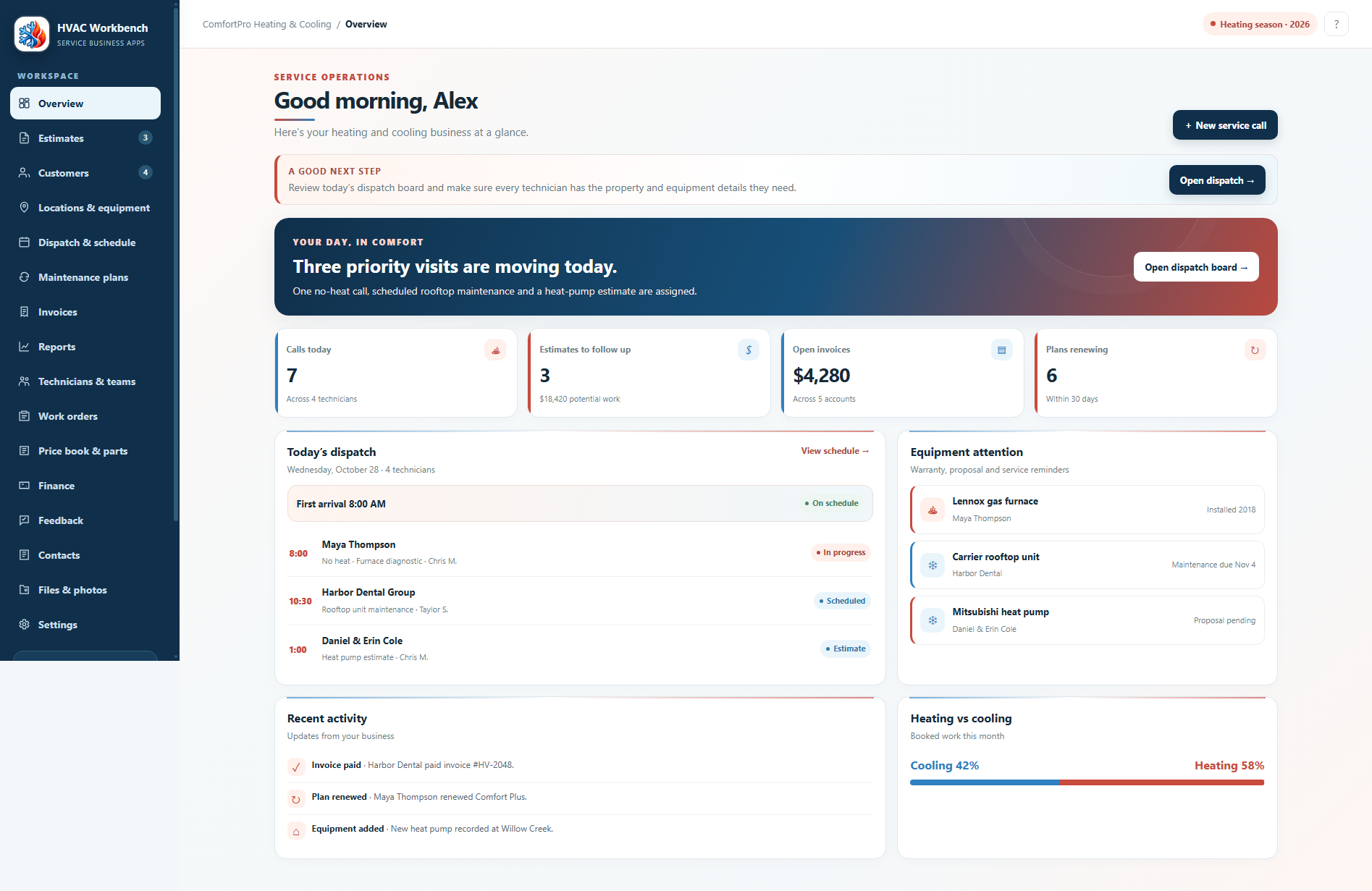
HVAC Workbench dashboard showing routes, estimates, seasonal work, and recent activity
Built for the owner’s day

Know what needs attention before the next technician heads out.

The dashboard brings today’s dispatch, estimates to follow up, open invoices, maintenance plans, seasonal work, and recent activity into one clear view.

  • Quick links to add customers, create estimates, open routes, or review invoices
  • Separate work areas for customers, properties, estimates, jobs, maintenance plans, invoices, and reports
  • Responsive pages designed for desktop, tablet, and phone use
  • A focused interface with clear routes, seasonal work, and next steps
Business results

Spend less time reconstructing the story of a service job

Quote with the property in viewProperty details, measured work, and reusable services help keep pricing clear.
Keep field work organizedCustomers, properties, jobs, routes, invoices, and payments stay connected.
Stay ahead of each seasonMaintenance plans and seasonal work keep upcoming service visible.
Know what needs attentionEstimates, routes, invoices, payments, and reports are available in the same workspace.

See the complete HVAC Workbench workflow

The demo uses fictional information, so you can explore customers, properties, estimates, routes, recurring maintenance, invoicing, and reporting safely.

Open the HVAC demo